유니티 에디터에는 로그가 바로 출력되기 때문에 에러 확인이 가능하지만, 빌드했을 때나 안드로이드 기기에서 실행을 했을 때는 에러 로그를 확인하기 어려운 점이 있다.
실시간으로 로그를 화면에 출력해주는 기능을 구현할 수도 있지만, 만드는데 많은 시간이 걸릴 수 있기 때문에 간단하게 Text 파일로 저장하는 기능을 만들었다.
Log 메세지가 발생하면 함수가 실행될 수 있도록 Application.logMessageReceived에 추가한다.
private void OnEnable()
{
    Application.logMessageReceived += LogToTxt;
}


private void OnDisable()
{
    Application.logMessageReceived -= LogToTxt;
}
원하는 타입의 Log 메세지만 출력할 수 있도록 구분한다.
[SerializeField]
private bool isLog = true;

[SerializeField]
private bool isWarning = true;

[SerializeField]
private bool isError = true;


public void LogToTxt(string logString, string stackTrace, LogType type)
{
    if (type == LogType.Log)
    {
        if (!isLog)
            return;
    }
    else if (type == LogType.Warning)
    {
        if (!isWarning)
            return;
    }
    else if (type == LogType.Error)
    {
        if (!isError)
            return;
    }
}
StreamWriter 클래스를 이용해서 Log 메세지를 Text 파일로 저장한다.
파일이 존재하지 않는다면 파일을 새롭게 생성하고, 파일이 존재한다면 해당 파일에 계속 추가해서 Log가 기록된다.
using UnityEngine;
using System.IO;

public class DebugToTxt : MonoBehaviour
{
    [SerializeField]
    private bool isLog = true;

    [SerializeField]
    private bool isWarning = true;

    [SerializeField]
    private bool isError = true;

    private string fileName;
    private string filePath;


    public void Awake()
    {
        DontDestroyOnLoad(this);

        // 오늘 날짜로 파일의 이름을 결정
        fileName = System.DateTime.Now.ToString("yyyy-MM-dd");
    }


    private void Start()
    {

        // 생성될 파일의 경로설정
#if UNITY_EDITOR
        filePath = Application.dataPath;

#elif UNITY_ANDROID
        filePath = Application.persistentDataPath;

#endif
    }


    private void OnEnable()
    {
        Application.logMessageReceived += LogToTxt;
    }


    private void OnDisable()
    {
        Application.logMessageReceived -= LogToTxt;
    }


    public void LogToTxt(string logString, string stackTrace, LogType type)
    {
        if (type == LogType.Log)
        {
            if (!isLog)
                return;
        }
        else if (type == LogType.Warning)
        {
            if (!isWarning)
                return;
        }
        else if (type == LogType.Error)
        {
            if (!isError)
                return;
        }

        // 로그 메세지를 텍스트 파일에 저장
        // 파일이 없다면 새롭게 생성
        using (StreamWriter sw = new StreamWriter(Path.Combine(filePath, fileName), true))
        {
            sw.WriteLine($"[{System.DateTime.Now}] {logString} \n");
        }
    }
}
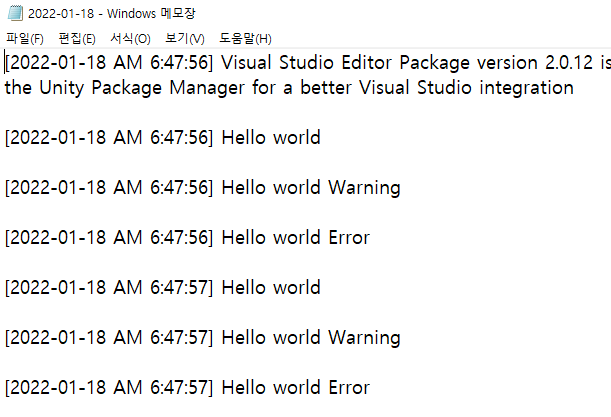
파일 경로 참고 : https://qits.tistory.com/entry/유니티-플랫폼별-경로-정리
반응형
'Unity > 기능구현' 카테고리의 다른 글
| [Unity] Prefab의 Missing Script 자동으로 삭제하기 (0) | 2024.07.19 |
|---|---|
| [Unity] Table CSV 파일을 ScriptableObject로 변환해보자 (0) | 2024.04.30 |
| [Unity] 게이지바 구현하기 (0) | 2024.02.25 |
| [Unity] 모든 하위 오브젝트의 레이어 변경하기 (0) | 2022.04.19 |
| [Unity] Debug Log 출력문에 색상 변경하기 (0) | 2022.04.19 |